
Most Python courses start from the language. This one starts from the problems that sent me looking for each part of it. I did not learn Python in the order a textbook teaches it. I learned it in the order my work broke: first the tool, then the structure, then the scale. Python 1001 puts those lessons in the order I wish I had found them, and every claim in it is a cell you can run.
Ten years before Python
I started with MATLAB in 2007, and for eight years it was my tool for everything numerical. In 2015 I moved to R for its statistics, and used it until 2017. Both did their job well. What pushed me to Python in 2017 was not one feature but a kind of freedom: one open-source language that could read any file, call any service, train a model, draw the chart and run on a server, with no licence to ask for. Nine years later I am still here, for the same reason. Whatever the next problem is, someone has usually already written an open library for it.
Notebooks changed how code was written
Jupyter notebooks changed the way I work more than the language itself did. Before them, writing code, testing it and looking at the result were three separate steps. In a notebook they happen in the same place, at the same time: you write a few lines, run them, see the table or the plot right underneath, and change the line that was wrong. Around the same time, libraries started to appear for almost everything, from data formats to statistics to deep learning, and the notebook became the place where they all met.
That is why the course is made of notebooks, saved with their results. You can read every lesson on the website without installing anything, and when you want to change something, you download the notebook or open it in Colab and run it yourself.
When the notebook became an enormous calculator
The freedom has a cost. A notebook grows one cell at a time, and after a few months of real work mine had turned into an enormous calculator: hundreds of cells, global variables everywhere, the same block copied with small changes, and results that depended on the order I had run things in. Nobody else could reuse it, and after a while neither could I.
Getting out of that meant learning structure: functions with clear inputs and outputs, then classes, then object-oriented design, then tests, packages and environments. The Medium module of the course is exactly that path: notebook 05 on object-oriented Python (the four pillars, special methods, dataclasses, protocols, composition), 06 on Pythonic techniques (decorators, context managers, type hints, logging, pytest) and 07 on turning code into a library that can be built, tested in a clean environment and published.
When pandas ran out of room
The second wall was size. pandas is wonderful until the dataset no longer fits in memory, and then it stops being slow and starts failing. Before the general move to the cloud, the answer for me was to learn big data tools like Spark and run them locally, on one machine, to process datasets that pandas could not hold. Then the notebooks themselves moved to the cloud: from 2022 I worked in Databricks, which is essentially the same notebook idea running on a Spark cluster someone else manages.
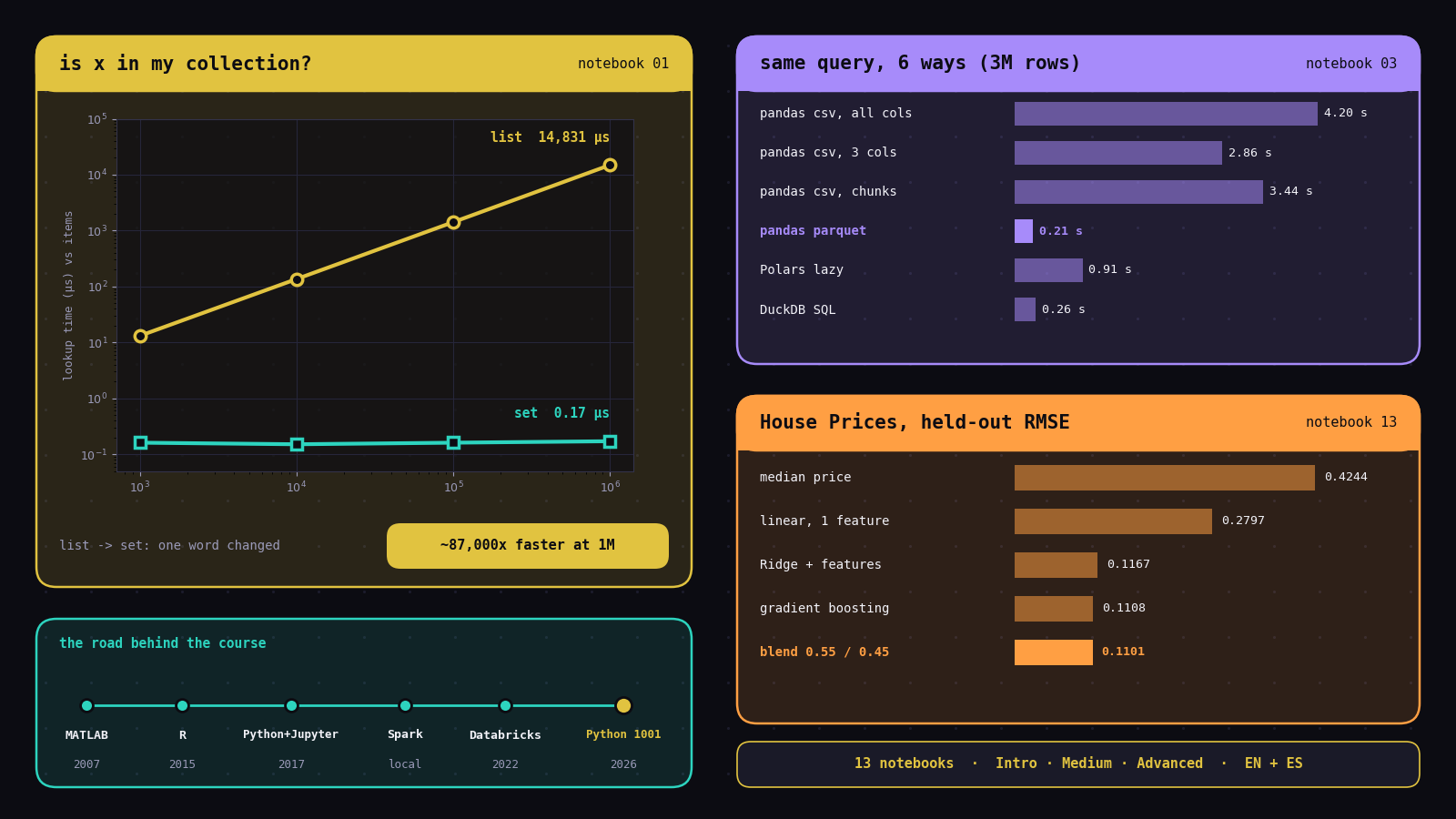
Notebook 03 follows that whole path on a laptop: measure memory first, use compact types, stream in chunks, store Parquet instead of CSV, let a query engine (Polars or DuckDB) do the work, and only then reach for Spark. The same query, run six ways on a 3-million-row file, shows why the order matters:
| Approach (mean temperature of fault readings per site) | Seconds | Extra peak MB |
|---|---|---|
pandas read_csv, all columns | 4.20 | 229 |
pandas read_csv, 3 columns, compact types | 2.86 | 37 |
pandas read_csv in chunks | 3.44 | 43 |
pandas read_parquet, pruned and filtered | 0.21 | 109 |
| Polars lazy scan | 0.91 | 101 |
| DuckDB SQL | 0.26 | 67 |
Speed comes from the file format and the engine; memory comes from holding less. Most of the extra memory for Parquet, Polars and DuckDB is the engines themselves being loaded, a fixed cost that stays flat while a full pandas load keeps growing with the file.
Thirteen notebooks, three modules
The Advanced module is Python applied to real fields: survival analysis on a breast-cancer trial, a pendulum derived with SymPy and an orbit checked against conservation laws, Okun's law tested decade by decade, the same CNN written in PyTorch and in TensorFlow, and seven forecasting methods on two problems chosen so that a different family wins each one. It is not an AI engineering course. It is the ground that the AI work on this site stands on.
Three results worth keeping
1. From the beginning: the structure you pick matters more than you think
Coming from MATLAB, where almost everything is a matrix, I underestimated Python's basic containers for a long time. Notebook 01 measures one question, "is this item in my collection?", for a list and a set of growing size:
| Items | list | set |
|---|---|---|
| 1,000 | 13.1 µs | 0.16 µs |
| 100,000 | 1,413.8 µs | 0.16 µs |
| 1,000,000 | 14,831.2 µs | 0.17 µs |
The list checks items one by one, so its time grows with its size; the set looks the item up by its hash, so its time does not grow at all. At a million items the set answers about 87,000 times faster. That is the chart on the cover, and it is the cheapest speed-up in the whole course: one word changed, no new hardware.
2. From the advanced material: Spark writes a recipe before it cooks
The idea that made Spark click for me is that most of what you write does nothing at the time you write it. Reading a file, filtering, grouping and joining are transformations: they only add steps to a recipe, a query plan, and no data moves. Only an action (show, count, collect, write) asks Spark to cook it. In notebook 03, spark.read.parquet(...) on the 3-million-row file reads only the schema.
Because Spark sees the whole recipe before it starts, its optimiser can rewrite it. The plan printed with explain() shows the filter on status and the three needed columns pushed down into the Parquet scan (PushedFilters, ReadSchema), so the other columns are never read. The notebook writes the same query twice, once with the DataFrame API and once in SQL with spark.sql(...); both compile into the same plan and the check prints identical results: True.
3. From the Kaggle capstone: read the licence, then blend
The capstone solves Kaggle's House Prices challenge end to end, and its first lesson has nothing to do with models. Competition files are governed by the competition's rules, which usually forbid redistributing them, so a public course should not re-host them. The competition data is a subset of the Ames Housing dataset that Dean De Cock compiled for teaching, which is openly available, so the course uses that original and leaves the Kaggle files on Kaggle.
Then it climbs from the simplest possible model, scoring every step on 733 held-out sales that are touched exactly once, at the end:
| Model | Held-out RMSE (log price) |
|---|---|
| Predict the median price | 0.4244 |
| Linear regression on log(living area) | 0.2797 |
| Ridge with engineered features | 0.1167 |
| Gradient boosting | 0.1108 |
| Blend: 0.55 Ridge + 0.45 boosting | 0.1101 |
The blend's median error is 5.2% of the sale price, and 80% of houses land within 9.8%. A linear model and a tree ensemble make different kinds of mistakes, so averaging them beats either one. The blend weight was chosen by cross-validation on the training set only; the test set stayed a true final exam. Those habits (licence first, baseline first, features inside a Pipeline so nothing leaks, validate before you test) are the part I would keep if I could keep only one notebook.
Why I wrote it down
Beyond the technology, this course is a personal map. If you came from MATLAB or R and still remember the first time a notebook showed you a chart under your code, you have walked some of the same road. If your notebooks have turned into giant calculators, or pandas has started to choke on your data, the walls in this course are probably your walls too. And if you are just starting your own path, I hope it saves you a few of the years it took me to find these things out in the wrong order.
How the notebooks and the site are built
Each notebook is generated by a small Python builder script, so its text and code are reviewed as plain diffs, then executed on a laptop CPU and saved with its outputs. The text was checked against those outputs: every number quoted above comes from a saved run. Spanish versions are generated from the same builders, so code and results are identical in both languages. A GitHub Actions workflow renders the notebooks into the course website with nbconvert and publishes it.
What it costs to run
Nothing extra. The notebooks run on the reader's own machine, and the website is a set of static files on infrastructure that already serves everything else on this domain. No model API is called anywhere. The two small datasets that are downloaded (bike sharing and Ames Housing, about 1 MB each) come from OpenML under open licences, and the cover image above draws three real saved results with Matplotlib: the list-versus-set measurement from notebook 01, the six-way query from notebook 03 and the Kaggle RMSE ladder from notebook 13.
Try it
Start with notebook 01 if you are new, jump to notebook 03 if pandas is running out of memory, or go straight to the Kaggle capstone. The whole course is also available in Spanish.
Take the course
Thirteen notebooks in three modules, in English and Spanish, every one runnable on a laptop CPU.
Open the course → View on GitHub →