
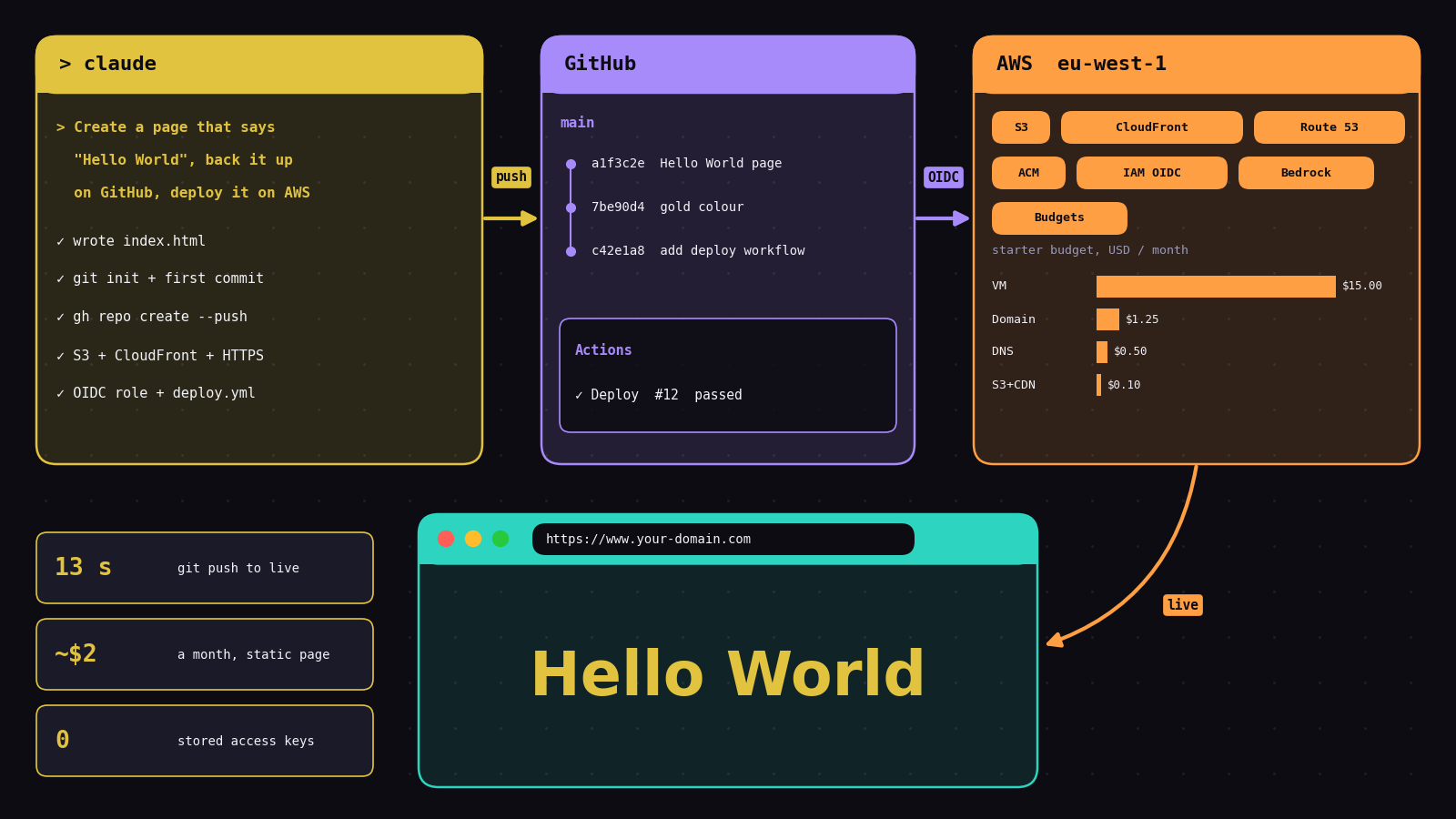
A while ago an acquaintance asked me how to start getting better at AI: not reading about it, actually building with it. My answer was very personal, because it was simply what I had done. I opened three accounts: one on Amazon Web Services, one on GitHub and one for Claude Code. I installed Claude Code on my computer and connected it to the other two. From that moment, a page that says Hello World, a dashboard or an AI agent is one conversation away from being live on the internet, on a domain of my own.
This note is that answer written out in detail: how to open each account, how to connect them, and how to go from an empty folder to a page that is public, versioned and redeployed automatically on every change. The example is deliberately tiny. The environment around it is the same one that runs every project on this site.
A notebook convinces you. A deployed app convinces everyone else.
I have written code for a long time: MATLAB from 2007, R from 2015, Python since 2017, then Spark and, from 2022, cloud notebooks in Databricks. Each step solved a real problem, and each one taught me something about structure and scale. But a result in a notebook has one audience: whoever can open that notebook.
The point you want to reach is different. You want to be able to say to a company or a client: hey, look at what I built myself. A real application that works and is deployed. Not a screenshot, a URL. That needs three things that notebooks never gave me together: a place for the code with its full history, a place where it runs for everyone, and a way to move from one to the other without doing it by hand. With an assistant that can work in your terminal, those three things stop being three separate careers. They become one environment you set up once.
The map: three accounts, one terminal
flowchart LR
    you["You
(a chat in the terminal)"] --> cc["Claude Code
on your computer"]
    cc -- "git + gh CLI
(your GitHub login)" --> gh["GitHub
repository + history"]
    cc -- "AWS CLI
(your AWS login)" --> aws["AWS
hosting, domain, AI models"]
    gh -- "GitHub Actions
OIDC, no stored keys" --> aws
    aws --> web["www.your-domain.com
live for everyone"]
    classDef you fill:#E1C340,stroke:#E1C340,color:#0c0c12,font-weight:bold
    classDef cc fill:#3a3418,stroke:#E1C340,stroke-width:2px,color:#f2f2f8
    classDef gh fill:#2c2547,stroke:#a78bfa,stroke-width:2px,color:#f2f2f8
    classDef aws fill:#3b2a16,stroke:#ff9f43,stroke-width:2px,color:#f2f2f8
    classDef web fill:#2dd4bf,stroke:#2dd4bf,color:#0c0c12,font-weight:bold
    class you you
    class cc cc
    class gh gh
    class aws aws
    class web web
    linkStyle default stroke:#E1C340,stroke-width:2px
Claude Code is the piece that changes the experience. It runs in your terminal, reads and writes files in your project, and runs commands (git, gh, aws) with the credentials you have already configured, asking your permission before it does. GitHub keeps every version of your work and runs the deploy. AWS hosts the result, sells you the domain, gives you AI models through Amazon Bedrock, and sends one bill for all of it.
Step 1 · Open your AWS account (and protect it on day one)
- Sign up at aws.amazon.com with an email you will keep for years. You will need a credit card and a phone for verification. Choose the free Basic support plan. New accounts start with Free Tier offers; read the current terms when you sign up.
- Lock the root user. The email you signed up with is the root user: it can do anything, including close the account. Turn on multi-factor authentication (MFA) for it right away, then stop using it for daily work.
- Create your everyday user in IAM Identity Center with administrator access, and sign in with that user from now on. It is what the command line will use.
- Pick one region and stay there. Keep your resources close to your users and in one place, so nothing is forgotten in another corner of the world. I use Europe (Ireland),
eu-west-1. The one exception you will meet is the certificate for a CloudFront domain, which AWS requires inus-east-1. - Set a budget before you build anything. In Billing and Cost Management, create a monthly budget with an email alert (5 dollars is plenty for a static page), and open Cost Explorer once so it starts collecting. This is the single most important step for staying in control.
Step 2 · Open your GitHub account
- Sign up at github.com and turn on two-factor authentication.
- Install
gitand the GitHub CLI (gh) on your computer, then log in once. The CLI stores the token for you, so neither you nor Claude ever has to paste it.
# one-time setup
$ git config --global user.name  "Your Name"
$ git config --global user.email "you@example.com"
$ gh auth login        # choose GitHub.com, HTTPS, log in with the browser
$ gh auth status       # check: "Logged in to github.com"
Step 3 · Install Claude Code
Claude Code needs a paid Claude plan (Pro or Max) or a pay-as-you-go account. Install it with the native installer or with npm, open a terminal in any folder, and type claude. The first run opens the browser to log in.
# macOS, Linux or WSL
$ curl -fsSL https://claude.ai/install.sh | bash
# or, with Node.js installed
$ npm install -g @anthropic-ai/claude-code

$ mkdir hello-world && cd hello-world
$ claude
CLAUDE_CODE_USE_BEDROCK=1 and your AWS_REGION). Then the assistant's usage lands on the same AWS invoice, under the same budget alerts, as your hosting and your app's AI calls.
Which interface? The same Claude Code, four doors
I am a techy user, so I work in a plain Linux terminal: one window, the chat and git in the same place, nothing in between. It is fast and it shows exactly which command runs. But it is not the only way in, and if you prefer to see the code Claude generates and edit it with the mouse, there are friendlier or more advanced options. All of them use the same account, the same CLAUDE.md rules and the same project folder, so you can mix them.
A good beginner combination: run Claude Code inside VS Code, so you watch each file change as it happens and learn to read the code, and move to the bare terminal later if you find, like me, that you no longer need the extra windows.
Step 4 · Connect the three
There is no special integration to install. Claude Code works through the same command-line tools you would use yourself, so connecting it means configuring those tools once.
# AWS CLI v2, logging in with your Identity Center user
$ aws configure sso    # region eu-west-1, profile name e.g. "dev"
$ aws sso login --profile dev
$ aws sts get-caller-identity --profile dev   # check: your account id
| Connection | Credential | Where it lives |
|---|---|---|
| Claude Code → GitHub | Your gh login | Your computer's keyring |
| Claude Code → AWS | Short-lived SSO session | ~/.aws, expires on its own |
| GitHub Actions → AWS | OIDC role, no stored secret | An IAM role that trusts only your repository |
| Your app → AI models | The server's IAM role | AWS, never in the code |
The rule behind the table: no long-lived password or key is ever written into a file. Add a CLAUDE.md at the root of your projects folder with your own rules (region, budget, naming, "never commit .env files") and Claude Code reads them at the start of every session. I keep mine for the things I never want to repeat: region, naming, and which folders may be cleaned up without asking.
At first it asks a lot. Then you get to know each other.
Be ready for this: in the first days, Claude Code asks for your permission at almost every step. Can I run this command? Can I edit this file? Can I push to GitHub? The work stops many times waiting for you to press a key, and it can feel slow. That is on purpose. It is acting in your accounts, with your money and your code, and until you have told it what is fine, asking is the safe default.
The interruptions shrink as you get to know each other. Each time it asks, you can allow that kind of action for good (reading files, running git status, deploying a static page) and keep the confirmation for what deserves it (deleting resources, anything that costs money, publishing outside your own accounts). The rules you write in CLAUDE.md do the rest: a decision you take once, such as "you may clean these cache folders without asking", is not asked again. After a few weeks, most of my sessions run from request to deployed result with only the questions that really matter.
Step 5 · Buy a domain
Think of a brand, www.your-domain.com, whatever you like, and register it in Route 53 inside the same AWS account. A .com costs in the order of fifteen dollars a year, the hosted zone that answers for it is fifty cents a month, and both appear on the same invoice as everything else. You can also ask Claude Code to check availability and register it for you; it will show you the command and wait for your approval before anything is charged.
Organise your workspace: one folder, one repository, one name
After a few projects, order matters more than any tool. My rule is simple: one folder per repository, all of them inside one general folder, and the same name everywhere. The folder, the GitHub repository and the subdomain carry the same name, so you never wonder where something lives.
~/Developments/                  # the general folder: start claude here
├── CLAUDE.md                    # rules for every project (region, naming, cleanup)
├── windward/                    # github.com/you/windward  -> windward.your-domain.com
│   ├── CLAUDE.md                # rules only for this project
│   └── ...
├── noise-monitor/               # github.com/you/noise-monitor -> noise-monitor.your-domain.com
├── kanban/                      # github.com/you/kanban -> kanban.your-domain.com
└── hello-world/                 # github.com/you/hello-world -> your-domain.com/hello-world
| Folder | GitHub repository | Where it is published |
|---|---|---|
noise-monitor/ | noise-monitor | noise-monitor.your-domain.com |
kanban/ | kanban | kanban.your-domain.com |
Use short lowercase names with hyphens, the same ones that are valid in a URL. When you start claude in the general folder, it sees all your repositories at once: you can say "work on noise-monitor" or "apply this fix to every project that uses the same login", and it moves between folders without you changing directory. The CLAUDE.md at the top holds the rules for everything, and each repository can add its own. Ask Claude to keep this structure from day one: "create every new project as a folder here, with a GitHub repository and a subdomain of the same name".
Resume the conversation or start a new one?
Claude Code keeps your past conversations per folder, which is one more reason to always start it from the same general folder. Two commands bring them back: claude --continue reopens the most recent one, and claude --resume shows the list so you can pick.
- Resume when the task is not finished and the context is still useful: you closed the terminal, restarted the laptop, or stopped for the day in the middle of a deploy. Claude remembers the decisions, the errors already seen and what is left.
- Start a new session when you begin a different task or move to another repository, when the previous work is finished and committed, or when the conversation has become very long. A long history makes every new message slower and more expensive, and the oldest details get summarised away. Inside a session,
/cleargives you the same fresh start.
The habit that makes new sessions painless: anything worth remembering goes into the repository (the README, CLAUDE.md, a commit message), not only into the chat. Then a fresh session starts already knowing it.
Step 6 · Hello World, from one chat
Now the magic starts. In the empty hello-world folder, with claude running, write what you want in plain words:
> Create a simple web page that only says "Hello World".
  Create a public GitHub repository called hello-world to back it up and track versions.
  Deploy it on AWS in eu-west-1 at www.your-domain.com with HTTPS,
  and add a GitHub Actions workflow so every push to main redeploys it.
  Use OIDC for the deploy, no access keys. Explain each step before running it.
What follows is a conversation, not a script. Claude proposes each step, shows the command, and runs it when you approve. For this request it builds the following:
%%{init: {'theme':'dark','themeVariables':{'actorBkg':'#2c2547','actorBorder':'#a78bfa','actorTextColor':'#f2f2f8','actorLineColor':'#4a4a66','signalColor':'#E1C340','signalTextColor':'#e8e8f0','labelBoxBkgColor':'#3b2a16','sequenceNumberColor':'#0c0c12','noteBkgColor':'#E1C340','noteTextColor':'#0c0c12','noteBorderColor':'#E1C340'}}}%%
sequenceDiagram
    participant Y as You
    participant C as Claude Code
    participant G as GitHub
    participant A as AWS
    rect rgba(225,195,64,0.12)
    Note over Y,A: First deploy: one conversation
    Y->>C: "A page that says Hello World, versioned and deployed"
    C->>C: writes index.html, git init, first commit
    C->>G: gh repo create hello-world --public --push
    C->>A: S3 bucket (private) + CloudFront + HTTPS certificate
    C->>A: Route 53 record www.your-domain.com
    C->>A: IAM role that trusts only this GitHub repo
    C->>G: .github/workflows/deploy.yml
    end
    rect rgba(45,212,191,0.14)
    Note over Y,A: Every change after: a git push
    Y->>C: "Change the colour to gold"
    C->>G: commit + push
    G->>A: Actions: sync files, refresh cache
    A-->>Y: new version live on your domain
    end
The page
<!DOCTYPE html>
<html lang="en">
<head>
  <meta charset="UTF-8">
  <meta name="viewport" content="width=device-width, initial-scale=1.0">
  <title>Hello World</title>
  <style>
    body { margin: 0; min-height: 100vh; display: grid; place-items: center;
           background: #0c0c12; color: #E1C340; font-family: system-ui, sans-serif; }
    h1 { font-size: clamp(2.5rem, 10vw, 6rem); margin: 0; }
  </style>
</head>
<body>
  <h1>Hello World</h1>
</body>
</html>
The automatic deploy
The workflow is short because the hard part, trust, lives in AWS: the IAM role accepts tokens only from your repository, so GitHub never stores an AWS key.
name: Deploy
on:
  push:
    branches: [main]
permissions:
  id-token: write      # lets GitHub ask AWS for a short-lived token
  contents: read
jobs:
  deploy:
    runs-on: ubuntu-latest
    steps:
      - uses: actions/checkout@v4
      - uses: aws-actions/configure-aws-credentials@v4
        with:
          role-to-assume: arn:aws:iam::<account-id>:role/github-deploy-hello-world
          aws-region: eu-west-1
      - run: aws s3 sync . s3://<your-bucket> --exclude ".git*" --delete
      - run: aws cloudfront create-invalidation --distribution-id <id> --paths "/*"
You can see the same page live at forwardforecasting.eu/hello-world. It is the file above, published through this site's own pipeline: same idea (push to GitHub, Actions deploys to AWS with OIDC), with my existing server as the destination instead of a bucket.
Step 7 · From Hello World to AI
With the environment in place, the next projects are only bigger conversations. Ask for a form that sends text to an Amazon Nova model in Bedrock through a small Lambda function. Then an agent that calls tools. Then a dashboard with your own data behind a login. Each one is a new repository, deployed the same way, and you understand a little more of the process each time, until you can build functional applications that go from simple processes to complex ones with AI models and agents.
One practical choice I recommend from experience: call AI models through Bedrock in your own AWS account rather than through a separate key per provider. Access is controlled by the same IAM roles as everything else, and the cost appears on the same bill.
Which model? Not the most advanced, the right one
A question every beginner asks: should I always use the most powerful model? No. Claude comes in tiers, and the price per token grows much faster than the difference you will notice on everyday work. These are Anthropic's list prices per million tokens in October 2026:
| Model | Best for | Input $/M | Output $/M |
|---|---|---|---|
| Haiku 5.5 | Fast, simple, high-volume tasks inside your app | 0.10 | 0.50 |
| Sonnet 5.5 | Everyday coding, deploys and agents | 2 | 10 |
| Opus 5.5 | Hard design and debugging problems | 4 | 20 |
| Fable 5.1 | The most demanding, long reasoning work | 10 | 50 |
I use Sonnet for almost everything, and this is why. Building a page, writing a workflow, creating a Lambda function or a dashboard is not a problem where raw intelligence is the bottleneck; clear instructions are. Sonnet handles that kind of coding and agent work very well, at half the price of Opus and a fifth of Fable, and it answers faster, which keeps the conversation flowing. As an illustration, a long working session that reads 2 million tokens and writes 200,000 costs about 6 dollars on Sonnet, 12 on Opus and 30 on Fable, before any caching discount. On a monthly subscription the same logic applies: a lighter model makes your usage allowance last longer.
My rule of thumb: start with Sonnet. Move up to Opus only when Sonnet fails twice on the same problem, for example a tricky architecture decision or a bug you cannot isolate, and come back down when it is solved. Move down to Haiku, or to a small Amazon Nova model in Bedrock, for the repetitive calls your own application makes thousands of times. In Claude Code you switch with the /model command at any moment of the conversation.
Be the owner of your resources
Three results worth keeping
1. Thirteen seconds from git push to a live page
When I published the Hello World page for this note, I timed it: 13 seconds from git push until the page answered on the public URL. That is not a lucky run. Over the last 53 successful deploys of this site, the median was 20 seconds, with the fastest at 16 and the slowest at 29.
The lesson: once publishing costs twenty seconds and zero decisions, you stop batching changes and stop being afraid of them. You ship small, often, and the history in GitHub tells you exactly what changed.
2. Start humble: about two dollars a month for a static page
You do not need a big budget to start. When I began, I paid for one small EC2 virtual machine at around 15 dollars a month, and it was more than enough for my first deployments. A static page like Hello World is cheaper still, because there is no server running at all:
| Starter budget, per month (USD) | Static page (S3 + CloudFront) | One small VM (how I started) |
|---|---|---|
| Hosting | < 0.10 | ~15 |
| Domain (.com, ~15 a year) | ~1.25 | ~1.25 |
| Route 53 hosted zone (DNS) | 0.50 | 0.50 |
| AI model calls while you experiment (Bedrock, pay per use) | cents | cents |
| Total | ~2 | ~17 |
The small VM is worth it when you want to run a backend, an API or a database next to your pages; a static page alone does not need it. The bill grows only when you decide to build more: today, with more than twenty projects on the same account, all the AI model calls of all of them cost 2.94 dollars in September. Set your budget alert just above your plan, 5 or 20 dollars, and you find out from an email the same week if something runs away, not from a surprise at the end of the quarter.
3. One shared key, four projects down
Early on, several of my projects called an AI model through a single shared API key from one provider. When that key had a problem, four projects broke at the same time. The fix was to move new AI work to Amazon Bedrock: access is granted through IAM roles like everything else, the usage is visible per service in the same Cost Explorer, and there is no secret key to share or leak.
The lesson for a beginner: centralising is not only about one invoice. It is about one place where access, cost and failures are visible. Today that one account and one GitHub profile hold 29 active repositories, and they all follow the same path you just read.
Why I wrote it down
This started as a reply to one person, and I think it fits many more. If you know some programming but everything you have built lives on your own computer, the gap to close is not another course. It is this environment. If you have never programmed, a chat in a terminal is now a real way in, as long as you read what it proposes and ask why. Once you have the three accounts connected, you have the magic wand in your hand: build demonstration projects with the technologies that interest you most, deploy them, and keep going until you can show someone a real application that works.
What this environment costs
The accounts on AWS and GitHub are free to open. Claude Code needs a paid Claude plan, or pay-as-you-go use through the API or Bedrock; that is usually the largest fixed cost. A static page like Hello World on S3 and CloudFront costs cents a month at small traffic, plus the domain (about fifteen dollars a year for a .com) and fifty cents a month for its DNS zone: about two dollars a month in total. When you want a backend too, one small VM is enough to start, around 15 dollars a month. Everything else grows only as fast as what you choose to build, and your budget alert tells you when it does.
See it live, then build your own
The Hello World page from this guide, and every project built with the same environment.
Open Hello World → Browse the projects →About the cover: an illustration drawn with Matplotlib of the environment described here. The timings come from this site's own deploy history; the starter budget from AWS list prices and what I paid when I started; the AI figure from AWS Cost Explorer for September 2026.